The equity protector
Limits for a whole broker account: a daily loss limit, a daily profit target and a max drawdown. At a limit, stop new trades or close everything and stop.
Written for TradeMirrorly 1.7.3 · Updated
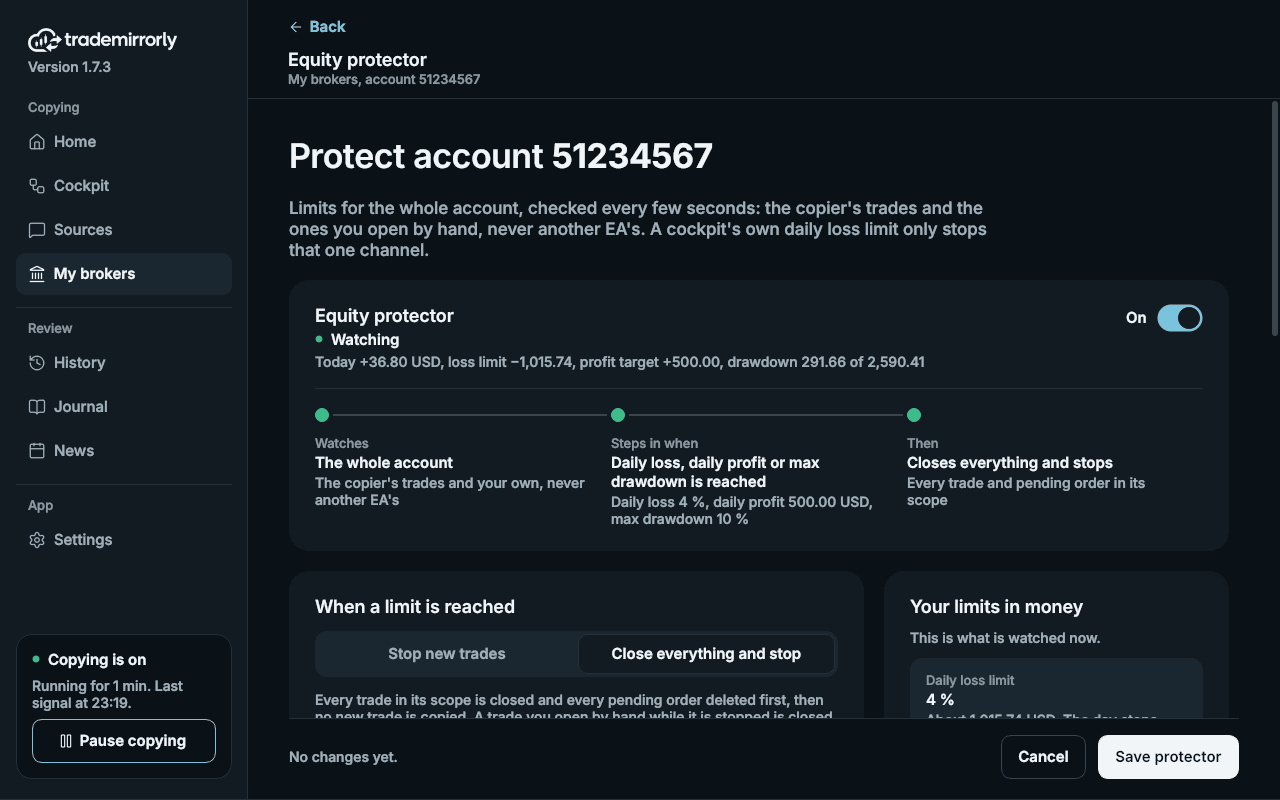
The equity protector sets limits for a whole trading account: a daily loss limit, a daily profit target and a max drawdown. When one is reached, it stops new trades, or closes everything and stops. You choose which.

How do I set it up?
- 1Open My brokers and click Protector on the account's card.
- 2Switch it on and set the limits you want, each in money or in % of the balance.
- 3Set the hour your day starts, for example a prop firm's reset time, and whether the drawdown counts from a starting balance you name or from the highest the account has been.
- 4Choose what a limit does: stop new trades, or close everything and stop. The app asks you to confirm the second when you save.
Which trades does it count?
The copier's trades and the ones you open by hand, never another EA's. A channel's own daily loss limit only stops that channel and closes nothing; the equity protector covers the whole account.
When does trading start again?
- After the daily loss limit or the daily profit target: when the next day starts.
- After the max drawdown: when you click Re-arm.
Where do I see that it stopped?
On the account's card in My brokers (PROTECTOR HIT), on Home, in the sidebar's status card and as a desktop alert. History lists each refused signal as NOT OPENED, with the reason.
The EA checks every 2 seconds while MetaTrader runs; for TradeLocker and Match-Trader the app checks while it runs. A close at a limit is a market close, so slippage or a weekend gap can carry the loss past your number.
The equity protector is on every plan. How each limit is measured is on the equity protector page.
Try it on a demo account first
Monthly and yearly plans start with a 3-day free trial. The guided setup takes about five minutes.
More in this topic
Pause copying in one click
One switch, or Ctrl+Shift+P, stops new trades from every source; or pause one source. Closes and changes keep running on the trades already open.
The news filter
Hold new trades around high-impact releases in the window you choose, per account. Closes, breakeven and changes always go through.
Late, duplicate and missed signals
A signal more than 2 minutes late is skipped, never opened late. A message delivered twice is copied once, and a dropped connection catches up.
What stays on your computer
Your Telegram session, message text, trade settings and broker passwords stay on your computer. What your TradeMirrorly account keeps, and why.