Equity protector · In TradeMirrorly 1.7.3
An equity protector for your whole trading account
Set a daily loss limit, a daily profit target and a max drawdown for the account. When one is reached, TradeMirrorly stops new trades, or closes everything and stops. You choose which.
- Windows and macOS
- Any broker, demo or live
- Synced with your web account
- Cancel anytime
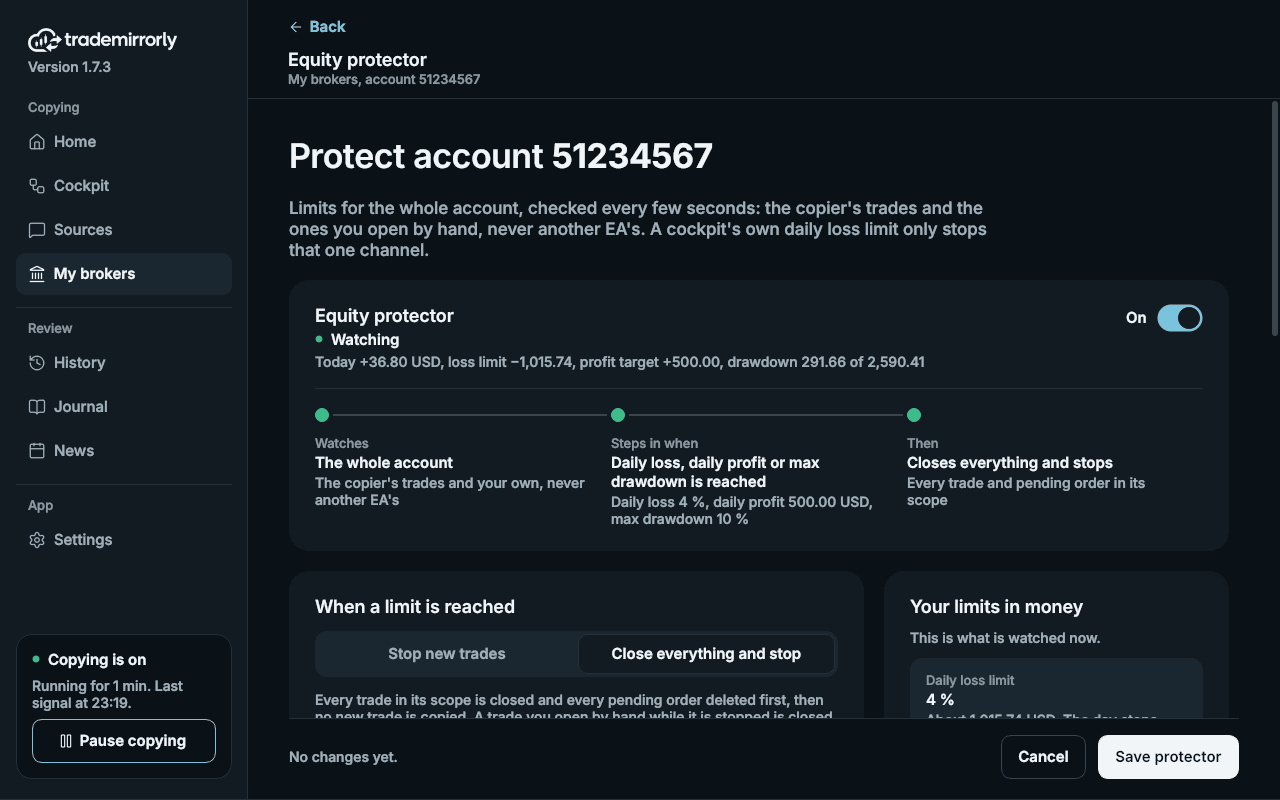
Sample data from the demo account of the app's screenshots. Not anyone's real results.
Try it
Push a sample account into its limits
Set the limits, then move the price, send signals and start a new day. The protector reacts with the same rule and the same words as the app.
 TradeMirrorly · Equity protector · sample account
Limits
NOW
Watching
Today 0.00 USD · loss limit −400.00 · profit target +500.00 · drawdown 0.00 of 1,000.00
Balance
10,000.00
Equity
10,000.00
Today
0.00
Open trades
- XAUUSD BUY 0.50 lots0.00
Make something happen
What happened
- Armed. The day starts now, at a balance of 10,000.00 USD.
A simulation in your browser with a sample 10,000 USD account. Not a real account, not real prices.
In short
What is an equity protector?
An equity protector watches a trading account and stops trading once the account has lost, or made, as much as you allow. In TradeMirrorly it covers the whole broker account: every trade the copier opens and every trade you open by hand.
It has three limits, each in money or in % of the balance: a daily loss limit, a daily profit target and a max drawdown. You decide what happens when one is reached.
- Daily loss limit, daily profit target and max drawdown
- In money, or in % of the balance
- Stop new trades, or close everything and stop
- MetaTrader 4, MetaTrader 5, TradeLocker and Match-Trader
When a limit is reached
Stop new trades, or close everything and stop
Stop new trades: new signals are refused, and History shows each one as Not opened, with the reason. Open trades stay, and are still managed: breakeven, trailing stop and TP hits carry on.
Close everything and stop: every trade in its scope is closed at market and every pending order is deleted. While it stays stopped it sweeps again every 10 seconds, so a trade opened by hand meanwhile is closed too. The app asks you to confirm this choice when you save.
A daily limit ends when the next day starts. The max drawdown stays until you press Re-arm.
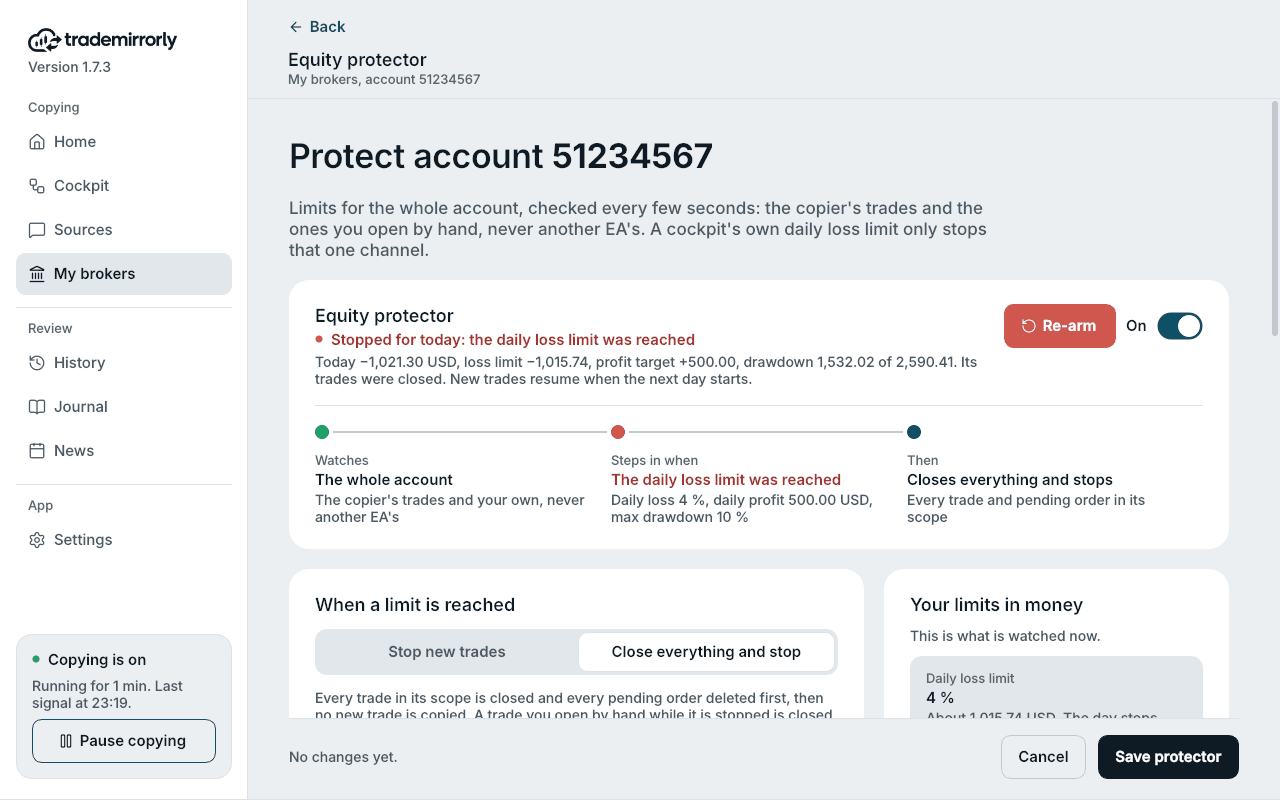
Sample data from the demo account of the app's screenshots. Not anyone's real results.
The rules
How each limit is measured
Each day
- Daily loss limit
- Money, or % of the balance the day started with
- Daily profit target
- Money, or % of the balance the day started with
- The day's result
- Trades closed that day, plus the open trades' floating profit or loss
- The day starts at
- An hour you choose: the broker's clock on MT4 and MT5, UTC on TradeLocker and Match-Trader
Max drawdown
- Limit
- Money, or %
- Fixed
- Measured from a starting balance you name
- Trailing
- Measured from the highest equity since it was armed
- Once reached
- Stopped until you re-arm it
Where it runs
- MetaTrader 4 and 5
- Inside the TradeMirrorly EA, every 2 seconds, while MetaTrader runs
- TradeLocker and Match-Trader
- In TradeMirrorly itself, every 5 seconds, while the app is open
- MetaTrader restarts
- A stop is kept in the terminal and survives the restart
- Plans
- Every plan
Which trades
Your trades and the copier's. Never another EA's.
Copied trades
Every trade TradeMirrorly opened on the account, from any of its cockpits.
Trades you open by hand
Counted in the day's result, and closed with Close everything and stop.
Other EAs on MT4 and MT5
Never counted and never closed.
TradeLocker and Match-Trader
Every trade of the account counts, since there the account's own equity is the measure.
Set it up
How to set up the equity protector
In TradeMirrorly 1.7.3, once per account.
- 1
Open the Protector
In My brokers, press Protector on the account's card.
- 2
Turn it on and choose the action
Switch Equity protector on, then pick Stop new trades, or Close everything and stop.
- 3
Set the daily limits
Set a daily loss limit, a daily profit target or both, in money or %, and the hour your day starts.
- 4
Set the max drawdown
Set it in money or %, measured from a starting balance you name or from the highest equity.
- 5
Save
The NOW card then says Watching, with today's result against each limit. With Close everything and stop, the app asks you to confirm first.
Prop firm challenges
Match your prop firm's rules, with a margin
Prop firm challenges usually set a daily loss limit that resets at a fixed hour, and a maximum drawdown that is fixed or trailing. The protector has the same three settings: the hour your day starts, a fixed starting balance, or the highest equity.
Set each limit a little inside the firm's own number. A close at a limit is a market close: slippage or a weekend gap can carry the loss past it.
TradeMirrorly is not affiliated with any prop firm. Check how your firm counts its daily loss and when its day starts.
Where you see it
A stop is never silent
On the account's card
My brokers shows PROTECTED, or PROTECTOR HIT in red with the reason.
On Home
Home's first card names the stop, with an Open the protector button.
Status card and desktop alert
A protector hit in the sidebar's status card, and one desktop alert for each stop.
In History
Every signal it refused says Not opened, and why.
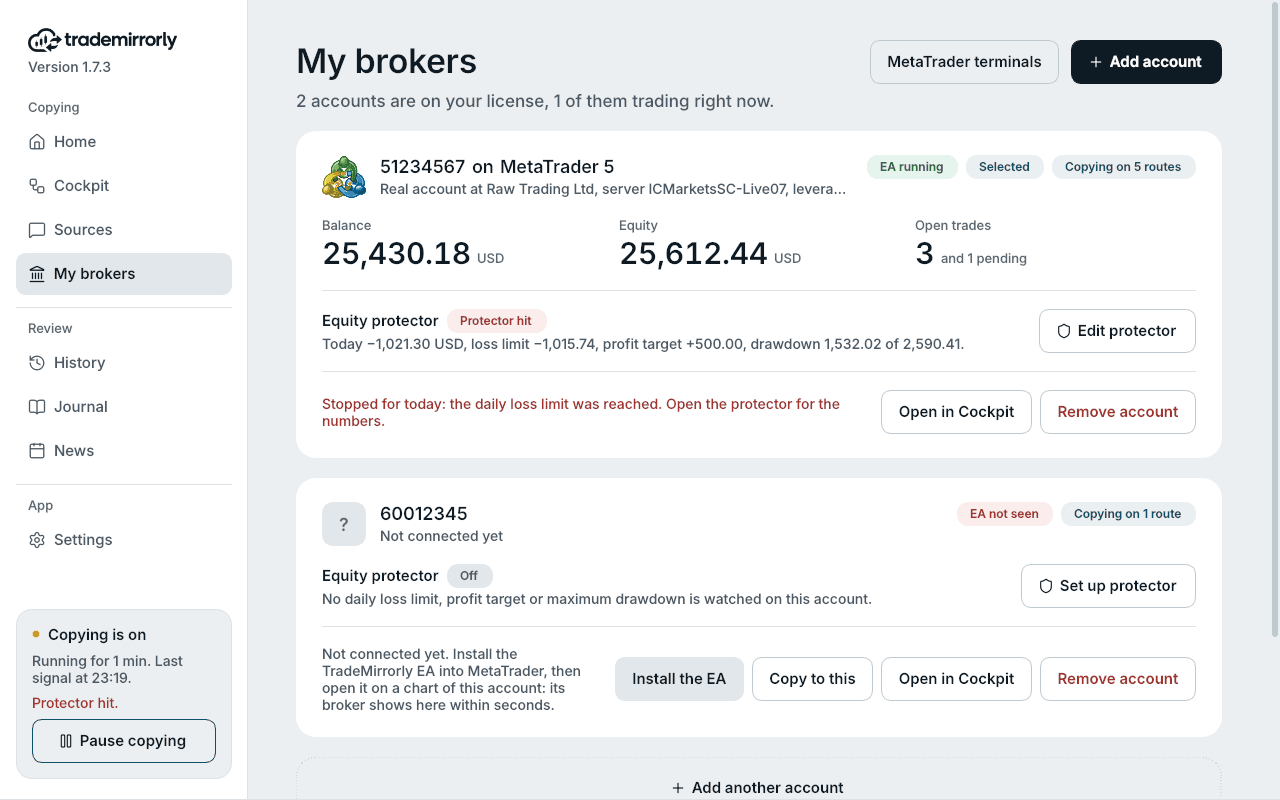
Sample data from the demo account of the app's screenshots. Not anyone's real results.
Compared
Equity protector or a channel's daily loss limit?
Both exist in TradeMirrorly. They answer different questions.
Equity protector
- Covers
- The whole account: copied trades and your own
- Looks
- Every 2 seconds (every 5 on TradeLocker and Match-Trader)
- Limits
- Daily loss, daily profit target, max drawdown
- At a limit
- Stops new trades, or closes everything and stops
A channel's daily loss limit
- Covers
- One channel's trades
- Looks
- When that channel's next signal arrives
- Limits
- Daily loss
- At a limit
- Skips that channel's new signals; closes nothing
Good to know
Before you rely on it
MetaTrader must be running
On MT4 and MT5 the EA does the watching. While MetaTrader is closed nothing is watched or closed; a Windows VPS keeps it running.
A limit is not an exact price
A close at a limit is a market close. Slippage, the spread or a weekend gap can carry the result past your number.
Trades open when you arm it
What was already open when it was turned on or re-armed doesn't count toward that day's result.
What starts it over
Turning it on, Re-arm, and changing what the drawdown is measured from start the day, the highest equity and the stop over. Changing a limit alone does not.
What is an equity protector?
A rule that watches a trading account and stops trading once it has lost, or made, as much as you allow. TradeMirrorly's covers the whole account, with a daily loss limit, a daily profit target and a max drawdown, in money or %.
Does the equity protector close my trades?
Only if you choose Close everything and stop: every trade in its scope is closed at market and pending orders are deleted. With Stop new trades, open trades stay and are still managed, and only new signals are refused.
Does it count trades I open by hand?
Yes. It counts the copier's trades and the ones you open yourself, and Close everything and stop closes both.
Will it close trades from my other EAs?
No. On MetaTrader 4 and 5 another EA's trades are never counted and never closed. On TradeLocker and Match-Trader, where there are no EAs, every trade of the account counts.
When does the daily loss limit reset?
At the hour you choose: on the broker's clock for MetaTrader 4 and 5, in UTC for TradeLocker and Match-Trader. A stop from the daily loss limit or the profit target ends then by itself.
What is the difference between a fixed and a trailing drawdown?
A fixed drawdown is measured from a starting balance you name, so the floor never moves. A trailing drawdown is measured from the highest equity since the protector was armed, so the floor rises as the account grows.
What happens after the max drawdown is reached?
The account stays stopped, through new days and restarts, until you press Re-arm in the app. Re-arm starts the day, the highest equity and the stop over from that moment.
Does it work when MetaTrader or my computer is off?
No. On MT4 and MT5 it runs inside the TradeMirrorly EA, so MetaTrader must be running. On TradeLocker and Match-Trader it runs in TradeMirrorly, so the app must be open. A Windows VPS keeps both running.
Will it stop exactly at my limit?
Not always. It looks every 2 seconds (5 on TradeLocker and Match-Trader), and a close is a market close, so slippage or a gap can carry the result past the number. Set your limit with some room.
Can I use it for a prop firm challenge?
Yes, as a safety net. Set the hour your firm's day starts, a fixed or trailing drawdown like the firm's, and each limit a little inside the firm's own number. It doesn't replace reading your firm's rules.
Does it work on TradeLocker and Match-Trader?
Yes. TradeMirrorly watches those accounts itself while it is open, with the same limits and choices as on MetaTrader.
Which plan includes the equity protector?
Every plan: Basic Starter and Pro Advantage. It's in TradeMirrorly 1.7.3, and the app and the EA update themselves.
Risk control on MT4, MT5, TradeLocker and Match-Trader
Set your limits before the next signal.
Start the 3-day free trial, connect your account, and turn the equity protector on in My brokers.
Sample data from the demo account of the app's screenshots. Not anyone's real results.
The simulator on this page runs the protector's rule in your browser, on a sample account with invented prices.