Security and privacy
Your accounts stay yours
TradeMirrorly runs on your computer. Your Telegram session, broker passwords and trade history stay there, and it can't move money. Here's what stays, what reaches us, and who we are.
- Windows and macOS
- Any broker, demo or live
- Your data stays on your computer
- Cancel anytime

Security and privacy
What stays on your computer
Your Telegram session never leaves your computer.
You sign in through Telegram itself, by QR code or the code Telegram sends. The session file stays on your machine.
Message text is never uploaded.
The app keeps a history of which signals were copied, without the messages' words.
Your trade history stays on your computer.
The Journal is built from your account on your machine. Nothing of it is uploaded.
TradeLocker and Match-Trader passwords are sealed.
Stored with Windows' own protection for your user (on a Mac, in your Keychain). An encrypted copy is kept with your license only so a new computer of yours can sign in by itself.
We never move money.
TradeMirrorly places the trades your signals ask for, on your own account. It can't withdraw, deposit or transfer.
Read-only on Telegram.
It never posts, never marks read and never reacts unless you switch that on.
What reaches us
What does reach our servers
Some things have to, so your license works and your account page can show what was copied. Never the text of a Telegram message.
- Your license and the computers it's activated on
- The trading accounts on your license
- The commands sent to your accounts (and the ones blocked), with your channels' names
- The alerts your webhooks receive, on their way to your app
- The encrypted copy of a TradeLocker or Match-Trader sign-in, used only to restore it on a computer of yours
Remote support
Remote support, only when you ask
Remote support is off until you switch it on, under Settings › Remote support. Then our support team can see your screen, and nobody else can connect.
Control of your mouse and keyboard, the clipboard and file transfer are separate switches, each off until you turn it on. While an engineer is connected an amber banner names them, and one click disconnects them. It stays on until you turn it off, and copying is never affected.
Support connections are recorded, as the Privacy Policy explains.

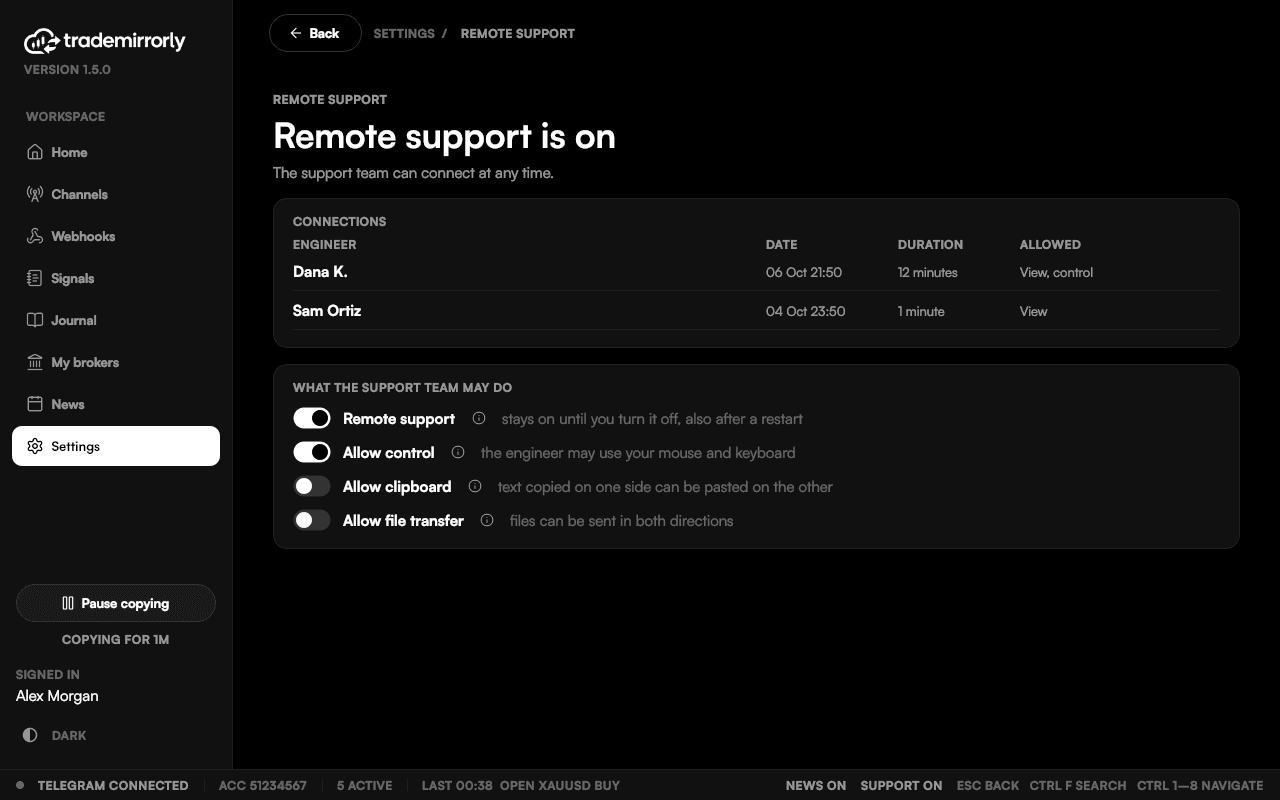
Remote support switched on, with what the support team may do.
Licenses and payments
Licenses, computers and payments
Your license key activates the app. Your plan sets how many computers and trading accounts it covers.
- Each computer you activate uses a seat. To free one, use Deactivate this computer in Settings › License, or manage it in your account.
- Each trading account you add, on any platform, uses one of your plan's trading accounts.
- Copying keeps working offline for up to 7 days on your last license check.
- Payments are handled by Whop. Your card details go to Whop, not to us.
- Cancel any time on the Billing page; your license keeps working until the end of the period you paid for.
Who we are
Who runs TradeMirrorly
The same details as in our Terms and Privacy Policy, and how to reach a person.
Registered operator
- Name
- TradeMirrorly
- Registered address
- 604 C. Hoare, San Juan, Puerto Rico 00907, United States
Office
- Office address
- 30 Stud Road, Yaldhurst, Christchurch 8012, New Zealand
Support
- Chat
- The chat button on this site
Documents
- Terms
- Terms of Service
- Privacy
- Privacy Policy
- Refunds
- Refund Policy
- Software
- End User License Agreement
Is my Telegram account safe?
You sign in through Telegram itself, by scanning a QR code or with the code Telegram sends you. The session is stored only on your computer and is never uploaded.
Is my TradeLocker or Match-Trader password safe?
It's sealed on your computer with Windows' protection for your user, or the Mac Keychain. An encrypted copy is kept with your license, used only to sign a new computer of yours in. Besides TradeLocker or Match-Trader themselves, that encrypted copy on TradeMirrorly's license service is the only place it goes.
Can TradeMirrorly withdraw money from my account?
No. It places the trades your signals ask for, on your own account. It can't withdraw, deposit or transfer.
Will the channel admin know I'm copying?
No. TradeMirrorly only reads. It never marks messages as read or reacts to them unless you switch that on in Settings, and it never shows you online.
What happens if Telegram signs me out?
The app shows the sign-in screen and says your session ended; your channels, accounts and settings stay as they were.
Can the support team see my screen?
Only after you switch on remote support in Settings. Control, clipboard and file transfer are separate switches, off until you turn them on, and you can disconnect in one click.
How do I move to a new computer?
Free the old computer's seat with Deactivate this computer in Settings › License, then activate the new one with your license key. TradeLocker and Match-Trader sign-ins are restored on the new computer by themselves.
Your accounts, your computer, your rules.
Start the 3-day free trial and try it on a demo account first.