The news filter
Hold new trades around high-impact releases in the window you choose, per account. Closes, breakeven and changes always go through.
Written for TradeMirrorly 1.5.0 · Updated
The economic calendar is downloaded into the app twice a day, and on demand with Sync now. With the filter on, a new signal whose instrument follows a currency with a high-impact release inside your window, say 30 minutes before to 15 after, waits. Signals shows it as blocked, with the release named.
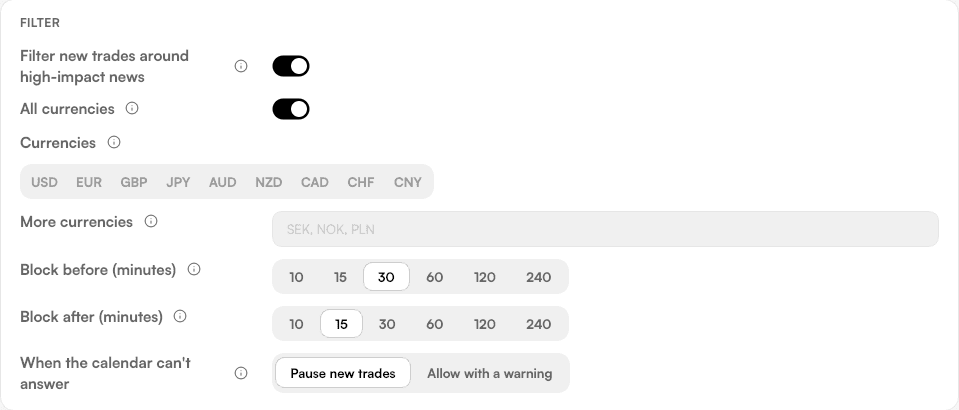
- Set per account, under News → News settings. Off until you turn it on.
- Close, breakeven and modify always go through.
- When the calendar can't answer, you choose: pause new trades, or allow them with a warning.
- The News page shows the week's releases in your local time and what the filter says for your account.
- The status bar says
NEWS ON, in red when the calendar is stale or missing.
Try it on a demo account first
Monthly and yearly plans start with a 3-day free trial. Setup takes about 3 minutes.
More in this topic
Pause copying in one click
One switch, or Ctrl+Shift+P, stops new trades. Closes and changes keep running, so the trades already open are still managed.
Late, duplicate and missed signals
A signal more than 2 minutes late is skipped, never opened late. A message delivered twice is copied once, and a dropped connection catches up.
What stays on your computer
Your Telegram session, trade settings, trade history and broker passwords stay on your computer. What does leave it, and why.
Quiet on Telegram
TradeMirrorly only reads. It never marks messages read or reacts unless you switch that on, and it never shows you online.