Pause copying in one click
One switch, or Ctrl+Shift+P, stops new trades. Closes and changes keep running, so the trades already open are still managed.
Written for TradeMirrorly 1.5.0 · Updated

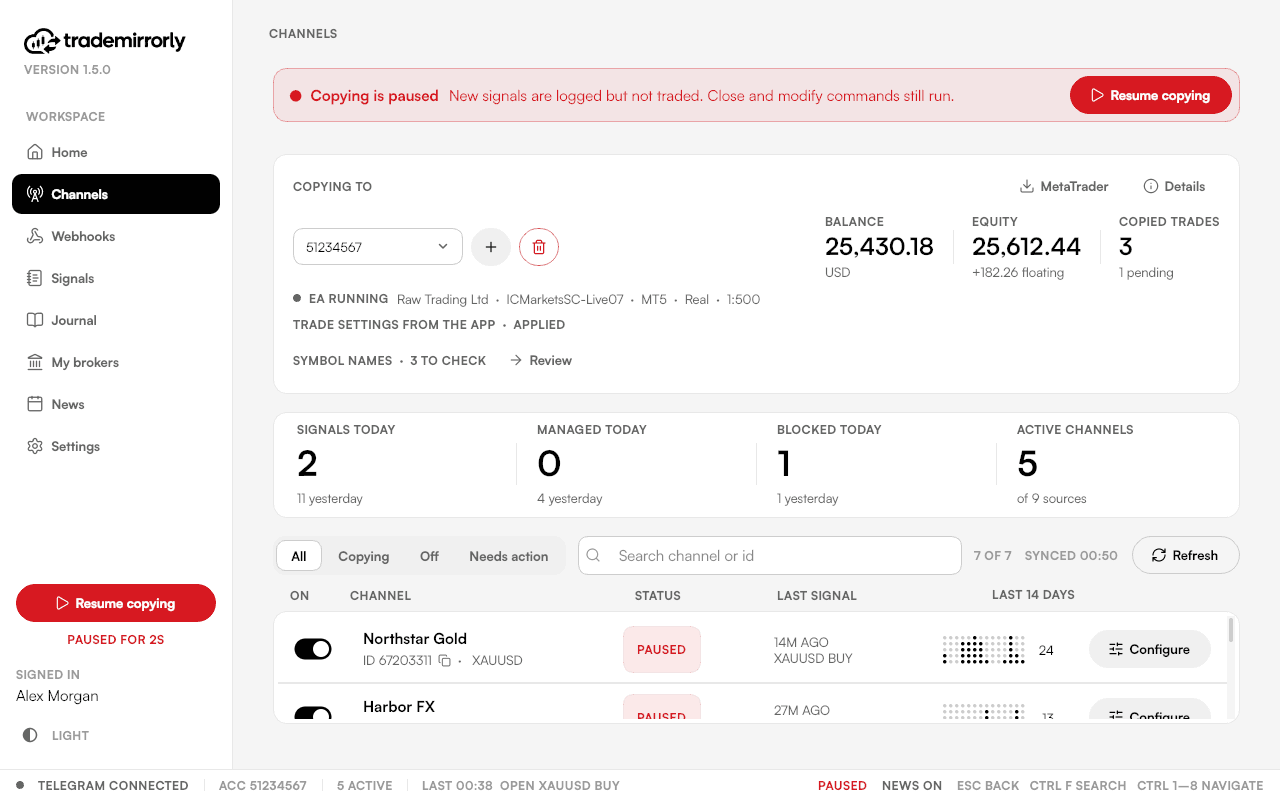
- The switch is in the sidebar;
Ctrl+Shift+Pdoes the same. - New trades stop. Close and modify commands keep running.
- Paused stays paused after a restart.
- The line under the switch counts how long copying has been on, or paused, across restarts.
Try it on a demo account first
Monthly and yearly plans start with a 3-day free trial. Setup takes about 3 minutes.
More in this topic
The news filter
Hold new trades around high-impact releases in the window you choose, per account. Closes, breakeven and changes always go through.
Late, duplicate and missed signals
A signal more than 2 minutes late is skipped, never opened late. A message delivered twice is copied once, and a dropped connection catches up.
What stays on your computer
Your Telegram session, trade settings, trade history and broker passwords stay on your computer. What does leave it, and why.
Quiet on Telegram
TradeMirrorly only reads. It never marks messages read or reacts unless you switch that on, and it never shows you online.