Symbol names: GOLD, XAUUSD and your broker
GOLD in the channel, XAUUSD at your broker? TradeMirrorly compares the two lists and suggests the names to add, one click each.
Written for TradeMirrorly 1.5.0 · Updated
Channels and brokers often name the same market differently: GOLD is XAUUSD at your broker, NAS100 is USTEC, and every pair may end in .raw.

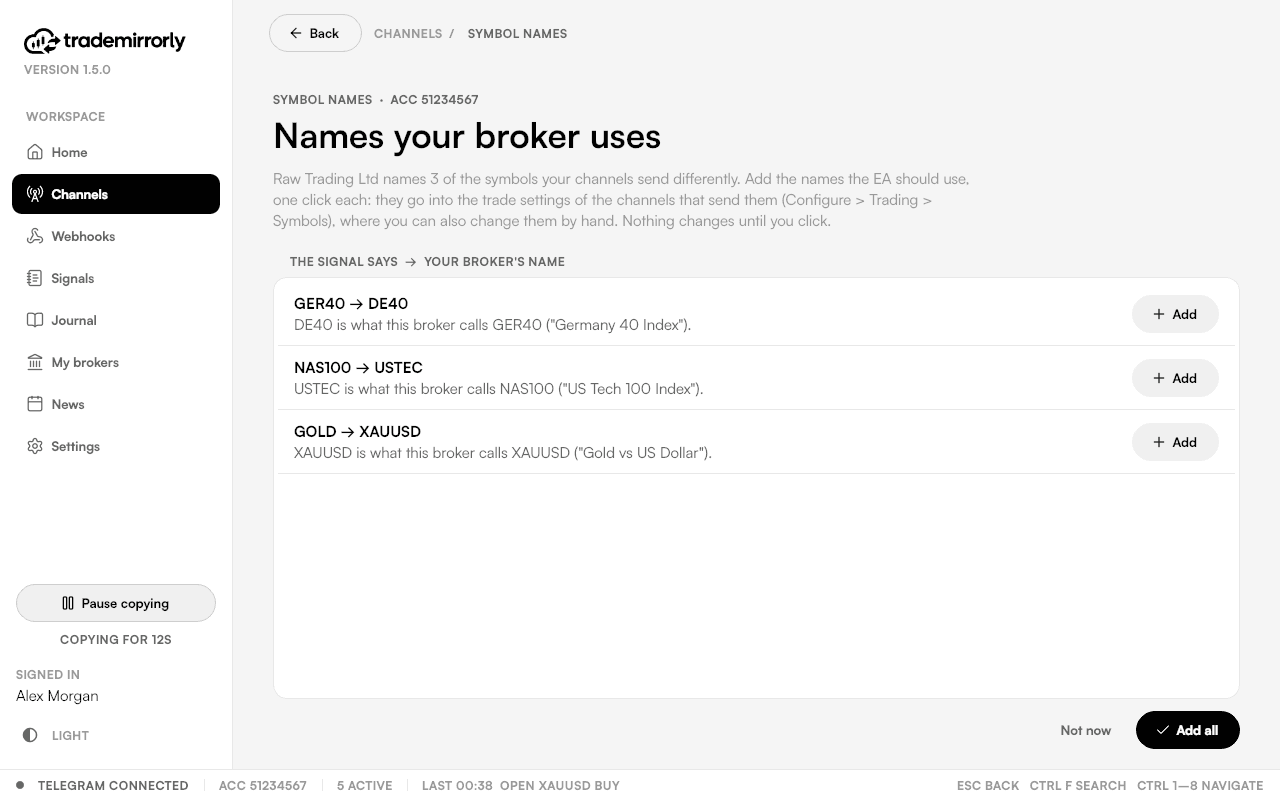
Suggestions
When the EA connects, the app compares the symbols your channels send with your broker's own list and suggests the names to add. Each suggestion is one click, straight into the settings of the channels that send that symbol. Nothing changes until you click.
Doing it yourself
- Symbol mapping under a channel's Configure → Trading → Symbols.
- Auto-match (on by default) finds your broker's own name, for example
XAUUSD→XAUUSD.rorXAUUSDm. - A prefix and suffix, and lists of excluded or only-these symbols.
- Extra symbols (Settings) adds names on top of the 166 the app reads by itself.
Look up the usual names for gold, indices, oil and crypto in symbol names.
Try it on a demo account first
Monthly and yearly plans start with a 3-day free trial. Setup takes about 3 minutes.
More in this topic
How signals are read
BUY or SELL, the symbol, entry, SL and any number of TPs are read with no setup, in 11 languages. What a readable signal looks like.
Replies that manage trades
Close, close half, breakeven, TP hit and a new SL or TP are read from replies to the original signal, in the same 11 languages.
Channel keywords
When a channel writes signals its own way, teach TradeMirrorly its words, with suggestions while you type. Share a setup as a sealed .tmk file.